File upload for Google Forms™
Get files from anyone through your Google Form, no sign-in needed
Your clients, applicants and customers add their files and fill in your form on one page, without a Google account. The files land in your own Google Drive, linked to each response. Free for 25 uploads a month; Pro is €8 a month.
Waiting for Google's review. Write to us, and we email you the day it opens.
Why Google's own upload question loses you answers
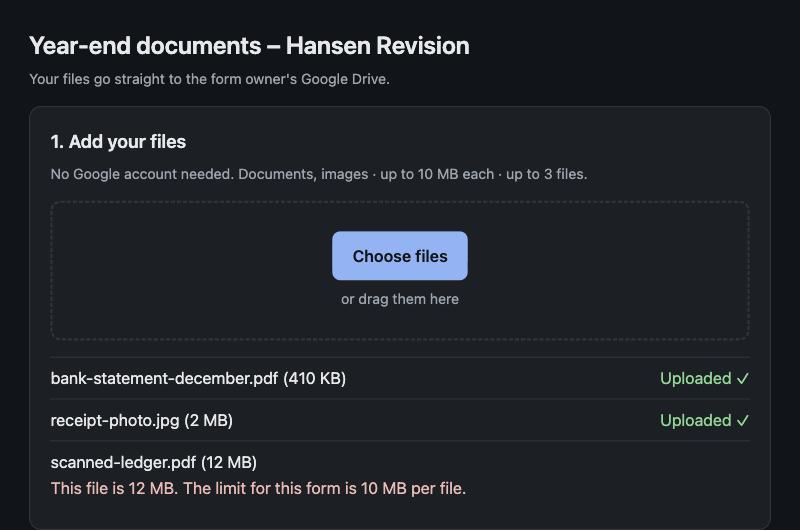
Google Forms asks everyone to sign in to a Google account before they can upload a file. A client on Outlook or iCloud gives up, or emails the receipt instead, and you match it by hand. In a form stored in a shared drive, the upload question isn't available at all. With this add-on, nobody signs in, and every file arrives with its answer.
Each response gets its own folder in your Drive
Files go straight from the sender's browser to your Google Drive, in a folder per response named with the date and, on Pro, an answer such as the client's name. The “Uploaded files” column in your responses sheet opens it, and you get an email with the list of files. They never sit on our servers.
You decide what people can send
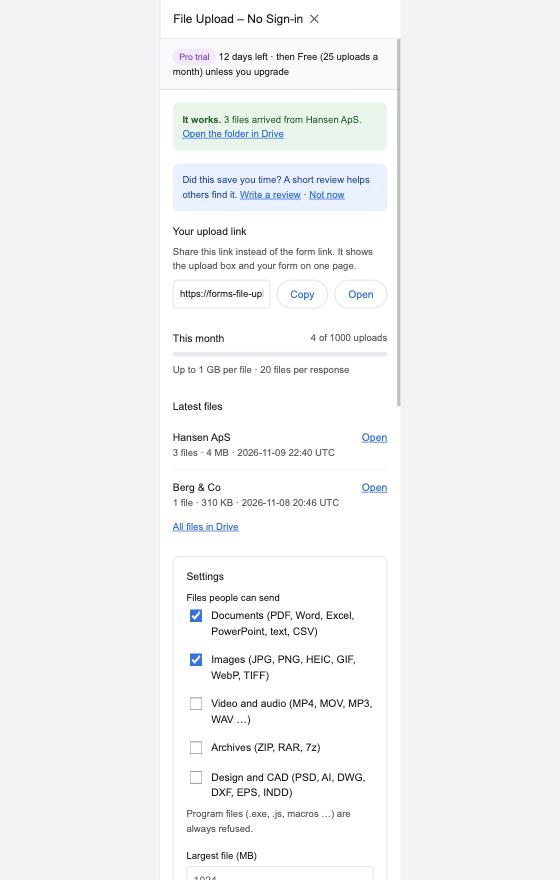
Tick documents, images, video, archives or design files, and set the largest file and how many files one person may send. Program files and Office files with macros are always refused. Pause uploads with one click, and the form keeps working. It works well on phones too: a client can photograph a receipt and send it in seconds.
Made for people who collect documents
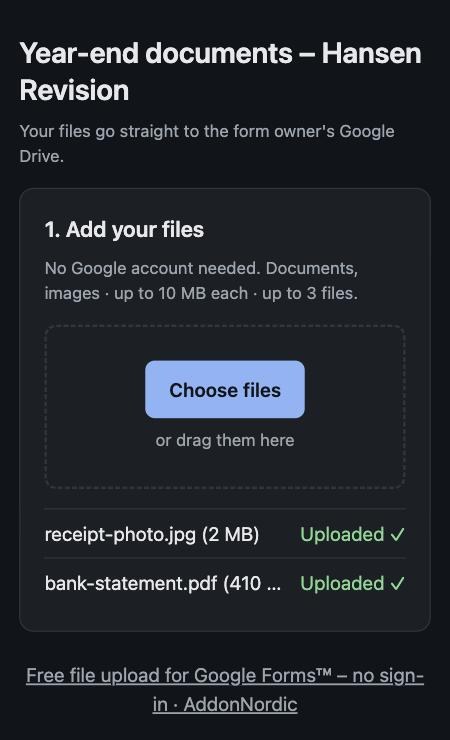
- Accountants and bookkeepers: receipts, bank statements and year-end documents from clients.
- HR and recruiters: CVs and cover letters from applicants who don't have a Google account.
- Agencies: briefs, logos and artwork from customers.
- Schools, clubs and associations: sign-up forms, photos and certificates.
Plans
Free
€0
for one form
- 25 uploads a month
- Files up to 10 MB, 3 per response
- Email when files arrive
- Small AddonNordic line on the upload page
Pro
€8
a month, or €72 a year
- Every form
- 1,000 uploads a month
- Files up to 1 GB, 20 per response
- Folders named after an answer, like the client's name
- No AddonNordic line
Business
€19
a month, or €180 a year, for your whole company
- Everyone at your company email domain
- Unlimited uploads
- Files up to 5 GB, 50 per response
- Data processing agreement
Prices in EUR, VAT added where it applies. Sold through Stripe. Cancel any time, and get a full refund within 14 days if it doesn't work for you. No storage fees: your files are in your own Drive.
How to add file upload without sign-in to a Google Form
- 1
Install the add-on
Install File Upload for Google Forms™ – No Sign-in from the Google Workspace Marketplace and open your form.
- 2
Click Add file upload
In the form, click the puzzle icon → File Upload – No Sign-in → Add file upload. A short “Uploaded files” question is added to your form.
- 3
Connect Google Drive
One click creates an upload folder in your Drive. The add-on can only use files it creates, not the rest of your Drive.
- 4
Share your upload link
Send the upload link instead of the form link. People add their files and fill in your form on the same page, without signing in.
Questions
Can people upload files to a Google Form without a Google account?
Not with Google's own file upload question: it asks every respondent to sign in. With this add-on they can. They open your upload link, add their files and fill in your form, with no Google account and no sign-in.
Why is the file upload option greyed out or missing in my form?
Google doesn't offer it when the form is stored in a shared drive. The add-on doesn't use Google's upload question, so it works in those forms too: files go to a folder in your own Drive.
Where do the files go?
Straight from the sender's browser into a folder in your own Google Drive, one folder per response. They never sit on our servers. The “Uploaded files” column in your responses sheet links each answer to its folder, and you get an email when files arrive.
How big can the files be?
Up to 10 MB on Free, 1 GB on Pro and 5 GB on Business. You can set a lower limit and choose which kinds of files you accept. Program files (.exe, Office files with macros) are always refused.
How much does it cost?
Free for one form and 25 uploads a month. Pro is €8 a month or €72 a year for every form and 1,000 uploads a month. Business is €19 a month for everyone at your company. New installs get Pro free for 14 days, and we never charge for storage, because the files are in your Drive.
Is it safe for client documents and CVs?
The files go to your Drive and stay there; we only keep the file name and size so the link in your sheet works. Each upload page expires after 48 hours, and every address has a rate limit. Business customers can sign our data processing agreement.
More help: File Upload for Google Forms help and support. Made by AddonNordic ApS, Aalborg, Denmark (CVR 46495985). Google Forms™ and Google Drive™ are trademarks of Google LLC; this add-on is not made or endorsed by Google.
Get your first file without a sign-in
Add file upload to your form, connect your Drive and send yourself a test file from a private window. It is in your Drive within a minute.